
Sorting Dialog Box
The Sorting dialog box lets you sort the query by up to three fields, in ascending and descending order.
Click on the picture for more information.
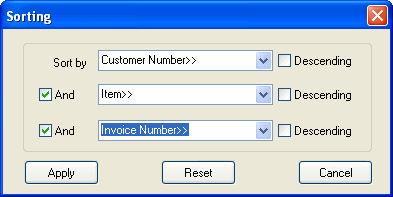
Sort by. Select the name of a field to sort by from the drop-down list.
Descending check box. Choose the Descending check box if you want to sort by this field in descending order (for example, from the largest quantity to the smallest).
And check box. Check the And check box to display another drop-down list and choose another sorting order. You can sort by up to three fields.
Apply. Use the Apply button to apply the specified sort to the query.
Reset. Use the Reset button to reset the query to the original, default sorting order.
Cancel. Use the Cancel button to cancel any changes to the specified sort.