Image of Sort screen Image of Sort screen Image of Sort screen Image of Sort screen Image of Sort screen Image of Sort screen Image of Sort screen Image of Sort screen Image of Sort screen Image of Sort screen Image of Sort screen Image of Sort screen Image of Sort screen Image of Sort screen Image of Sort screen Image of Sort screen Image of Sort screen Image of Sort screen Image of Sort screen Image of Inquiry screen showing sorted results. Image of Inquiry screen showing sorted results. Image of Inquiry screen showing sorted results. Image of Inquiry screen showing sorted results. Image of Inquiry screen showing sorted results. Image of Inquiry screen showing sorted results. Image of Inquiry screen showing sorted results. Image of Inquiry screen showing sorted results. Image of Inquiry screen showing sorted results. Image of Inquiry screen showing sorted results. Image of Inquiry screen showing sorted results. Image of Inquiry screen showing sorted results. Image of Inquiry screen showing sorted results. Image of Inquiry screen showing sorted results.

Sort a Query

Concept Link IconSee Also

A query is sorted in the result window.

The default order for sorting data in the results window is in ascending order.

  • Click the Sorting button to open the sorting dialog box.
  • Click on the picture for more information.
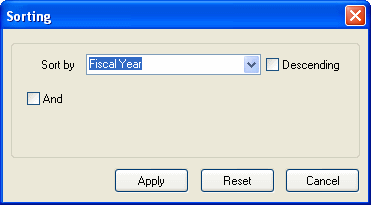
    image\IRESort1_shg.gif

  • Click the Sort by pull down arrow to reveal the available sort by fields.
  • Click on the picture for more information.
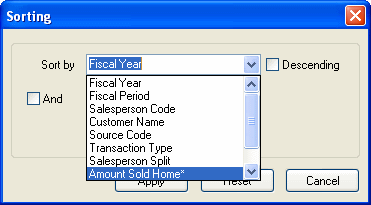
    image\IRESortd_shg.gif

  • If the Descending check box is checked, the sort order of the Sort by field will be in descending order (highest value displayed first).
  • Click on the picture for more information.
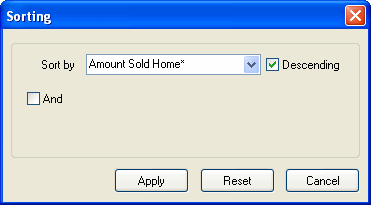
    image\IRESort2_shg.gif

  • Click the Apply button to apply the sort to the query and return to the result window.
  • Click the Cancel button to cancel the sort and return to the result window.

The sorted results window

The following results window is sorted in descending order by the Amount Sold Home (highest value displayed first).

Click on the picture for more information.
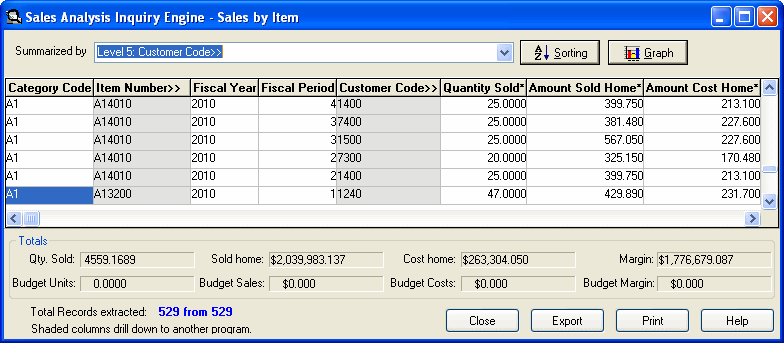
Image of Inquiry screen showing sorted results.

  • Click the Close button to close the result window and return to the main window.
  • Click the Print button to print the query in grid format.