
Routes define relationships between companies. To define a route, you list each of the companies on the route from the originator (the company that processes the transaction) to the destination (the company that ultimately receives the entry), and specify the intercompany loan accounts for each company on the route. Each company on the route is referred to as a level. Level 1 must be the originating company. The last level is the destination company.
A route can be between two companies, or there may be intermediate companies between the originator and destination. More...
You can have an unlimited number of intermediate companies on the same route.
More than one user can access the Routes screen at one time, and more than one user can access the screen while posting ICT A/P and ICT G/L batches.
- No assumptions are made about the default route in any module.
- ICT validates routes when you add a new line; however, only the first and last level companies are validated when you click Save.
- Routes cannot be deleted if there are unposted batches in ICT G/L or in ICT A/P.
- If you have not defined routes between the originator and destination, the program will display an error message, preventing you from completing a transaction.
- If the originator and destination company are the same, the route must be zero.
- If you edit a batch that was marked Ready To Post, its status will revert to "entered."
- If the distributions do not equal the document total, a warning message appears when you save the entry. You must correct the entry before you can post the batch.
- To delete a level, select a line and press the Delete key on your keyboard. The Delete button on the screen deletes the entire route, not the selected level.
Example 1: Routing Transactions With and Without Intermediate Companies
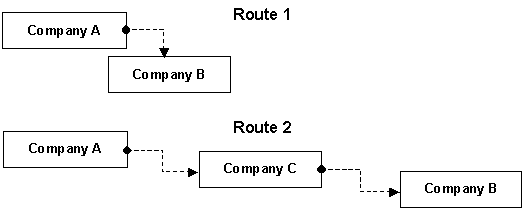
The following diagram illustrates two possible routes:
- Route 1 shows transactions originating in Company A, with Company B as the destination for the transactions.
- Route 2 shows transactions with the same originator (Company A) and destination (Company B) being moved through an intermediate company, Company C.
Example 2: Routing Transactions through Intermediate Companies
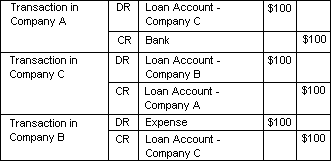
In this example, Company A pays $100 US on behalf of Company B, routing the transactions through Company C.
The ICT entry, using Company A as the originator, is as follows:

When this entry is posted in ICT, the following entries are created in the individual companies:
Route Maintenance
Defining routes (also called route maintenance) means choosing the companies and their loan accounts, so that entries can be captured in ICT without having to specify loan accounts separately. These accounts are accessed by the program when batches are posted.
Multicurrency
If the originating and intermediate companies have different functional currencies, the functional currency of the originator will be used as the source currency in the intermediate and destination companies.
Note: You can edit routes that have already been created by selecting the Finder or the navigation buttons beside the Route label (at the top of the screen), then choosing a route from the list. You can change the data that appears in the fields and columns, and click Save, or use the data to create a new route just by changing the route number.
If you delete a route, ICT will renumber all remaining routes.
Important! If you make changes to the chart of accounts of any of the companies along a route (including the originator and destination), after the route is set up, when you next use the route you may unintentionally post to a non-existent account or to an incorrect account. Be sure to click the Update Accounts button on the ICT Options screen when you change accounts in any company.
You must regularly check that the account codes in your routes are correct. (If you have Administrator-level privileges, you can use the Data Integrity checker to detect possible problems. For more information about checking data integrity, see the System Manager help.)